Network detection · OT security · Configuration assurance · Attack surface · Data security
Specialist security products
for your network and your data.
Seraxi builds focused security products. Each one answers a question your team struggles with today, such as which devices a new advisory hits or whose screen a leaked photo came from. Run them on-prem, air-gapped or in the cloud.
- On-prem · air-gap · cloud
- Each product licensed on its own
- English and Turkish support
- London · İstanbul
Network segments · Purdue
L3 → L1 · boundary crossing
TDS event stream
- 13:16:53 HIGH Modbus write · FC16 eng-ws-12 → PLC-07 (S7-1500) · outside change window
- 13:16:41 MED DNS tunnelling host-11 → *.sync-cdn.example · entropy 4.7
- 13:16:22 CRIT C2 beacon 192.168.40.23 → external · TLS 443 · 60s period
- 13:15:58 INFO New OT asset Rockwell CompactLogix · L1 · EtherNet/IP
- 13:15:30 MED Lateral movement SMB admin share · 192.168.12.7 → 3 hosts
Verdict: Unauthorized Modbus write to PLC-07 from an engineering workstation. 3 signals fused: IDS rule (FC16), behavioural ML deviation, Purdue boundary crossing L3→L1.
OT segment · Purdue
L3 → L1 · boundary crossing
OT event stream · passive
- 13:16:53 HIGH Modbus write · FC16 eng-ws-12 → PLC-07 (S7-1500) · outside change window
- 13:16:10 HIGH DNP3 cold restart hmi-02 → rtu-3 · unauthorised source
- 13:15:58 INFO New asset · L1 Rockwell CompactLogix · EtherNet/IP · auto-classified
- 13:15:22 MED Firmware download S7comm · PLC-03 · outside maintenance window
- 13:14:48 MED IT → OT session RDP · 192.168.20.14 → hmi-02 · L3 → L2
Verdict: Write to PLC-07 and cold restart of rtu-3 came from the same engineering workstation, 43 s apart. Not expected process behaviour; the Purdue L3→L1 boundary was crossed twice. Raw packets are in Trace Analysis.
Policy checks · 142 devices
- ✓ No default SNMP community
- ✓ Telnet / SSHv1 disabled
- ! TLS ≥ 1.2 on management 2
- ! Certificate > 30 days 7
- ✓ Firmware not end-of-support
- ✕ No open critical CVE 3
- 3 devices out of policy · advisory matched
Advisory → inventory match
- 22:04 NEW Advisory published FortiOS SSL-VPN · CVSS 9.8 · pre-auth RCE · fixed in 7.2.10
- 22:05 HIT edge-fw-01 · FortiGate 600F 7.2.7 · internet-facing · AFFECTED
- 22:05 OK dc-fw-02 · FortiGate 200F 7.4.3 · not affected
- 22:05 HIT br-fw-07 · FortiGate 60F 7.0.12 · VPN enabled · AFFECTED
- 22:05 HIT vpn-fw-04 · FortiGate 100F 7.2.6 · AFFECTED · backup verified 21:40
Result: 3 of 142 devices affected, 2 internet-facing. Recommended fix: upgrade to 7.2.10. Change window 02:00; signed baseline ready for rollback.
External scan · live
1 critical path · fix first
From open port to the app behind it
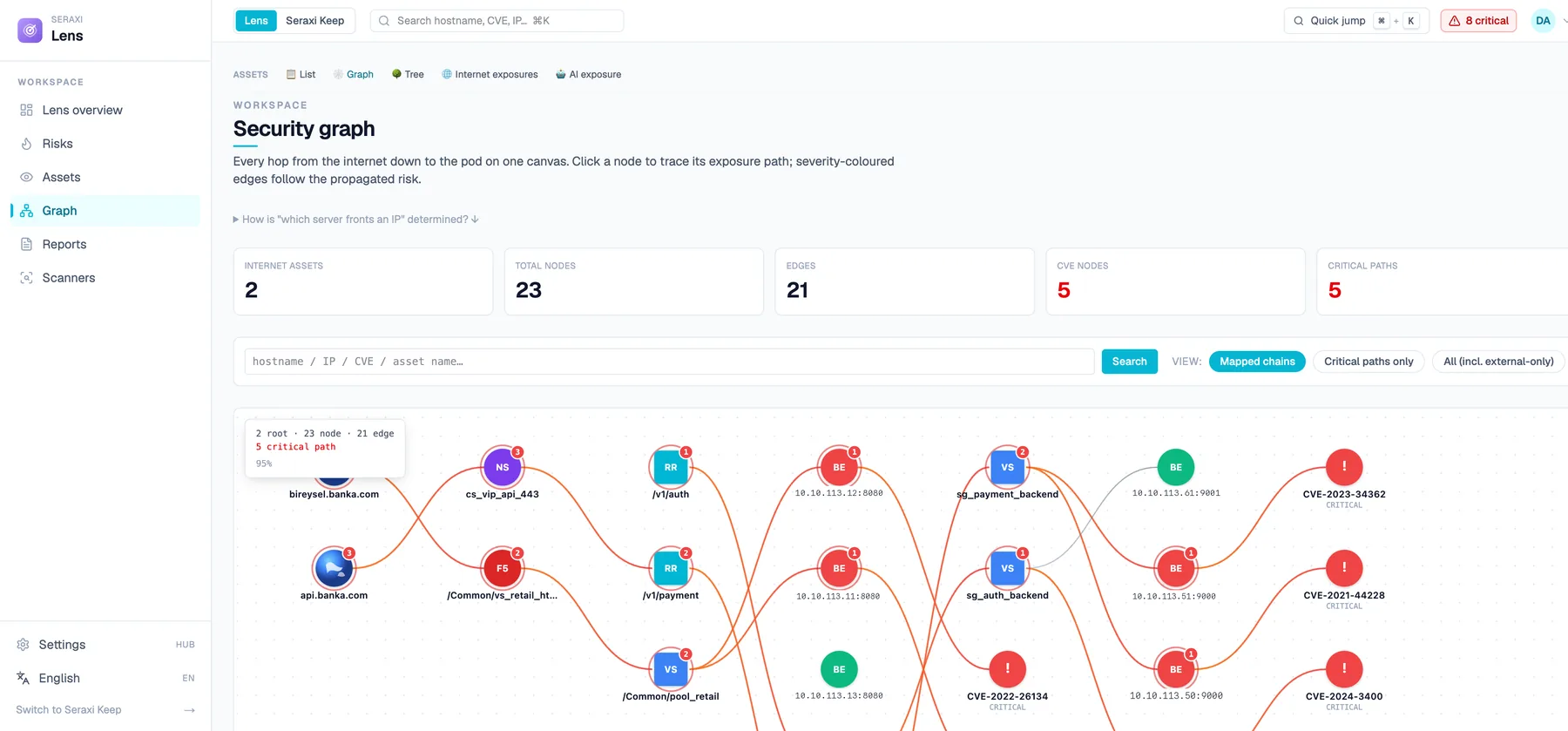
- hop 0 NET api.bank.example:8443 open from the internet · TLS 1.2 · cert 19 days left
- hop 1 F5 vs_api_443 · BIG-IP SNAT · pool pool_api
- hop 2 APP 10.10.113.11:8080 sg_auth_backend · Java 17 · Log4j 2.14
- hop 3 CVE CVE-2021-44228 · KEV EPSS 0.97 · reachable from the internet
- + AI Shadow AI ollama · 10.10.113.40:11434 · unauthenticated
Priority: Critical path: internet → F5 → auth backend → Log4Shell. Blast radius 3 applications. Nessus and Qualys findings are bound to the same asset; fix this one first.
Discovery · 1,240 endpoints
1 leak · source found
Incidents · sensitive data
- 09:12 HIGH musteri_listesi_2026.xlsx fs-01 · finance · 2,418 national IDs · owner notified
- 09:14 MOVE pasaport_taramalari.pdf pc-0142 · scanned document · moved to secure folder
- 09:20 LABEL butce_2027.pptx labelled Confidential · downgrade locked
- 10:41 LEAK Leaked screen photo taken with a phone · identity mark found
- 10:41 SRC a.yilmaz · pc-0187 10.20.14.88 · 2026-11-04 16:07 UTC
Result: The invisible mark in the photo gave the user, the machine and the time. The screen was showing the customer list at that moment. The incident is on record with the evidence image.
What each product answers
The questions that arrive at the worst possible time.
We think something happened on the network last night. What do we actually have?
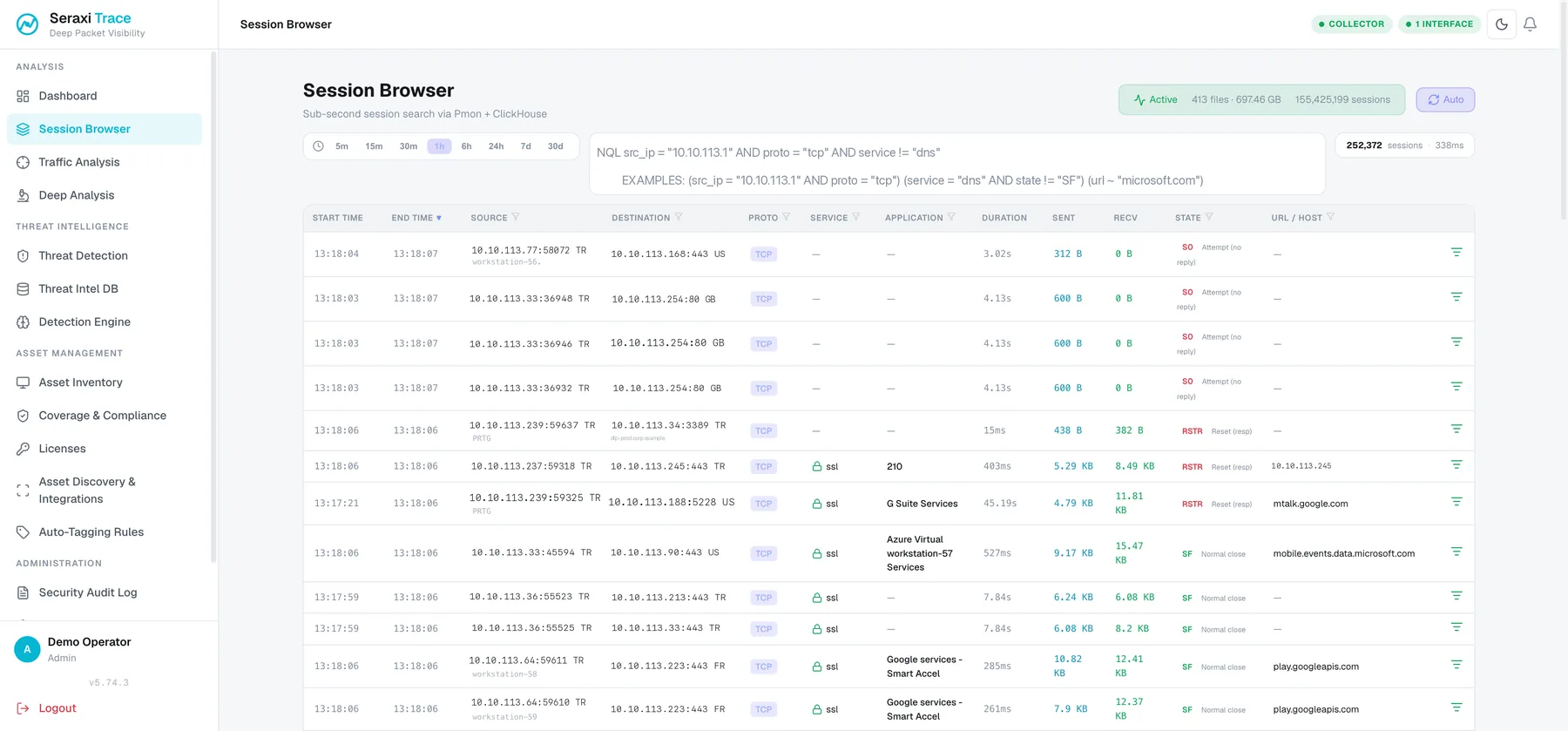
The packets. Trace Analysis replays that hour from the raw traffic, so you can hand the PCAP to incident response.
Open productA PLC took a write from a workstation. Was that supposed to happen?
Relay knows the Purdue level, the protocol and the change window. It flags the write in seconds and keeps the packets.
Open productA FortiOS advisory was published last night. Which of our devices are affected?
Keep matches the advisory to the model and firmware of every device you run and lists the affected ones within minutes.
Open productThe internet sees port 8443 open. Which internal application is behind it?
Lens draws the path from the open port to the internal service behind it and scores it by blast radius.
Open productA photo of a customer record on a screen is circulating. Whose screen was it?
Mark's invisible watermark recovers the user, the machine and the time from the photo.
Open productIndependent products for specific security problems.
Each product has its own buyer, its own licence and its own deployment. Start with the one your team needs.
Chapter 01 · Seraxi Trace
Network memory and threat detection
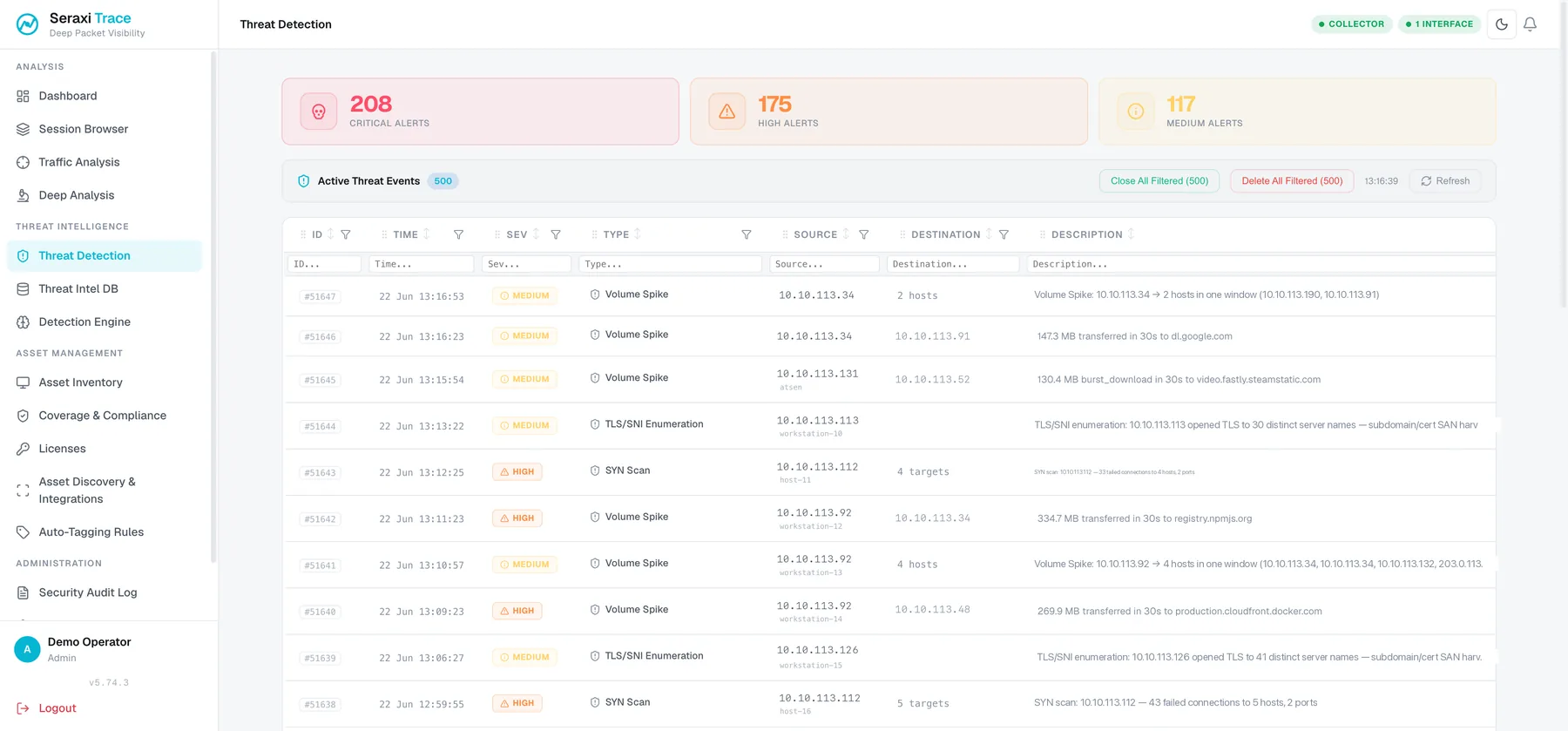
Trace records the raw traffic on your network, so an investigation starts from the packets. It detects threats with signatures, machine learning and an AI model that runs inside your deployment. It also builds an asset inventory from what it sees on the wire. Analysis, TDS and Assets are modules of one sensor.
Modules
- Trace Analysis Network memory
- Trace TDS Threat Detection System
- Trace Assets Inventory from the wire
What it answers
- Is something on the network talking to a domain nobody recognises?
- Trace TDS flags the behaviour on live traffic and shows the packets behind the verdict.
- Which hosts talk on the network but appear in no inventory?
- Trace Assets lists every device seen on the wire and marks the ones missing from AD, endpoint management or the CMDB.
Chapter 02 · Seraxi Relay
OT security for industrial networks
Seraxi Relay protects industrial networks without touching the process. It listens passively, identifies PLCs, RTUs, HMIs and SCADA servers from the traffic and places them on the Purdue model. It decodes the control traffic itself, including Modbus, DNP3, IEC 104, IEC 61850, OPC UA, PROFINET, EtherNet/IP and S7comm. An AI model learns what normal looks like for your process. Relay uses the Trace sensor for capture.
Capabilities
- Passive protocol decoding
- Purdue asset map
- Control-traffic baseline
- IT/OT boundary monitoring
What it answers
- What is actually on the plant network?
- Relay identifies every PLC, RTU, HMI and SCADA server from the traffic, with vendor, model, firmware and protocol, and places each one on the Purdue model.
- Can we do this without scanning the process?
- Yes. Relay only listens on a SPAN or TAP. It sends nothing to the process and installs nothing on any controller.
Chapter 03 · Seraxi Keep
Configuration assurance for network and security devices
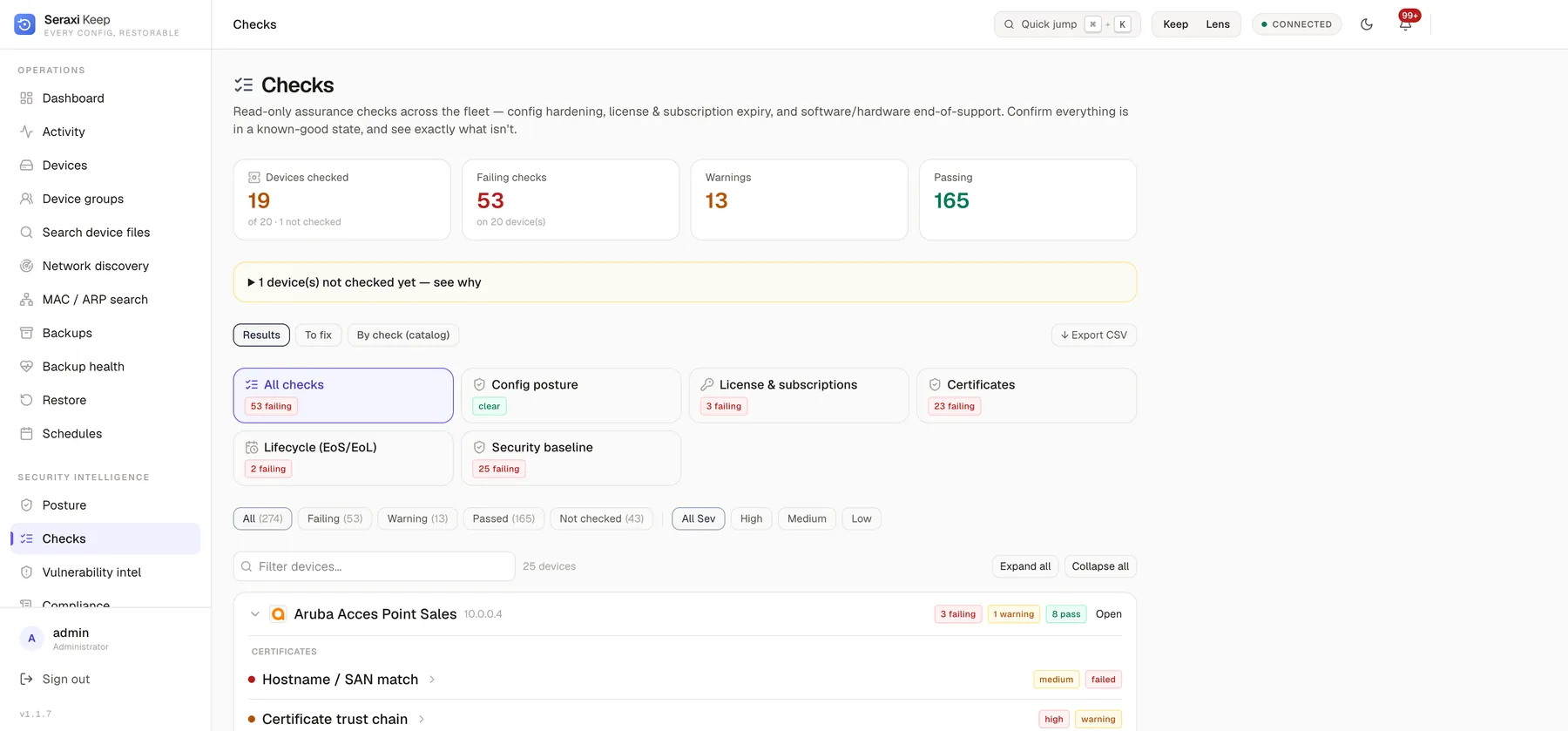
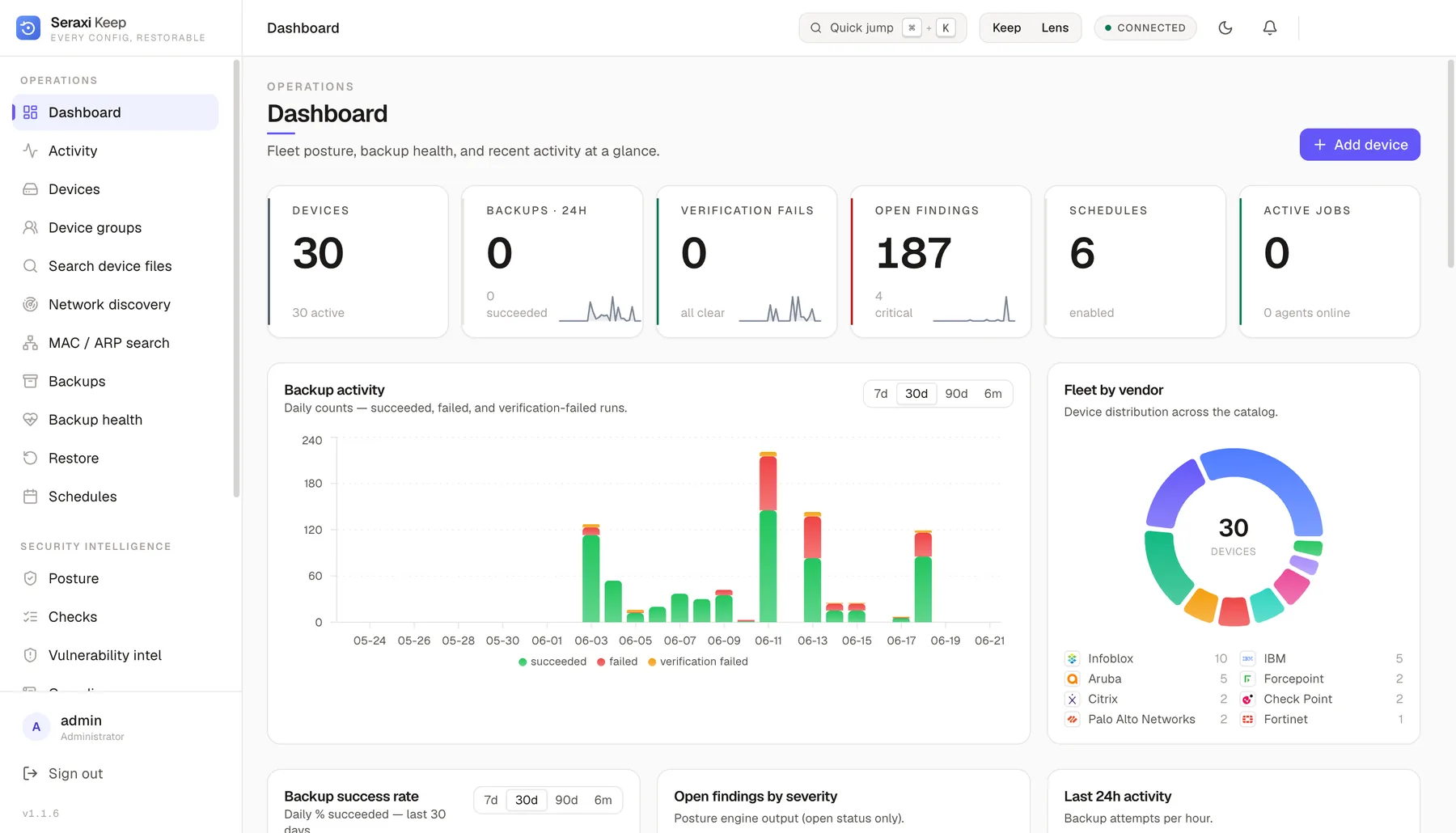
Keep connects to every firewall, router, switch and load balancer you run and keeps a verified baseline of each one. From that baseline it tells you which devices a new advisory affects, which configurations drift from policy, which certificates expire soon and which devices reach end of support. Verified backup sits underneath as the safety net.
Capabilities
- Advisory-to-device matching
- Baseline and policy controls
- Compliance checks
- Lifecycle: end of sale and end of support
What it answers
- Does every firewall comply with our security policy?
- Policy checks run against each device's baseline continuously. Every deviation is listed by device and control.
- Which certificates expire this quarter? Which devices lose support next year?
- Keep checks certificates and vendor lifecycle dates on every device, so refreshes are planned in advance.
Chapter 04 · Seraxi Lens
Attack surface management, outside in
Lens shows how an open port the internet can see leads to the internal application behind it, on one live graph. It includes its own external scanner, pulls in the scanners you already run, scores every finding with one Lens Risk Score and finds AI services nobody registered.
Capabilities
- Outside-in path mapping
- Built-in external scanner
- Your scanners in one view
- AI and shadow-AI exposure
What it answers
- Someone stood up an LLM server. Is it exposed?
- Lens finds self-hosted model servers and MCP servers and flags the ones without authentication.
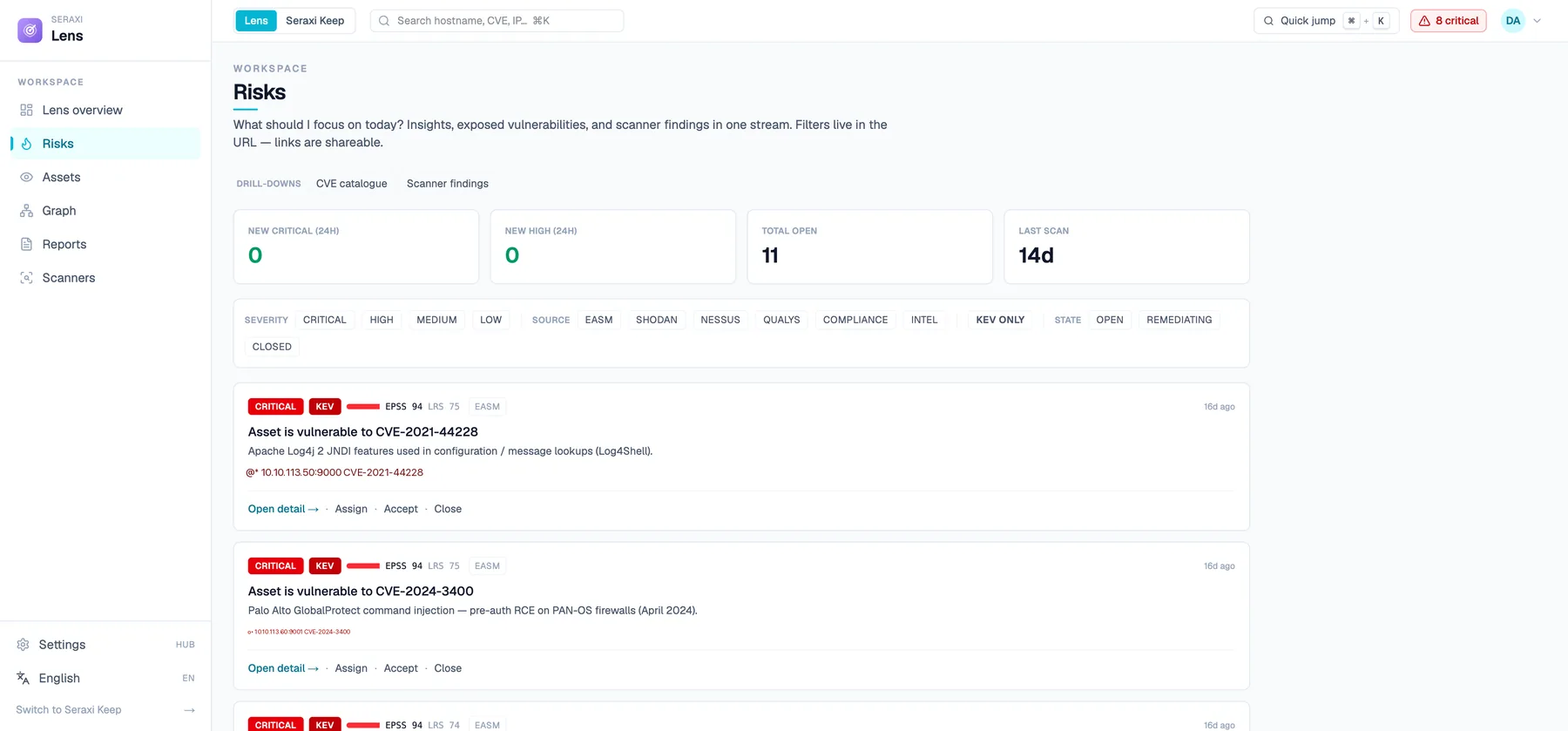
- We have 4,000 findings. Which one first?
- The Lens Risk Score combines CVSS, EPSS, KEV and reachability, weighted by blast radius.
Chapter 05 · Seraxi Mark
Data security · sensitive data discovery and response
Mark finds personal data sitting in files and traces a leaked photo of a screen back to the user and machine it came from.
Modules
- Discovery Sensitive data discovery
- Response Incident response and remediation
- Watermark Screen watermark and leak tracing
- Classify Classification and labelling
What it answers
- Where is personal data sitting today?
- Mark scans laptops and file shares for national ID, tax, IBAN, card and passport numbers, inside archives and scanned PDFs too. Every hit is listed with the file, its owner and the machine.
- We found the file. What happens to it now?
- Mark emails the owner, moves the file to a secure folder with its permissions intact, or deletes it. A note is left where the file was, and every move can be rolled back.
Coverage
The vendors you run. The frameworks you answer to.
Keep connects through each vendor's own interfaces. Controls map to the frameworks your auditors ask about. A mapping is evidence for your audit; certification stays with your auditor.
Vendors & platforms
- Firewalls & NGFW
- Palo Alto · Fortinet · Check Point · Cisco ASA / FTD
- Routing & switching
- Cisco IOS / NX-OS · Juniper Junos · Arista EOS · MikroTik
- SIEM & SOAR
- Splunk · QRadar · Sentinel · Cortex XSOAR
- Load balancers & ADC
- F5 BIG-IP · Citrix ADC · HAProxy · NGINX
- Network sensors
- SPAN / TAP · ERSPAN / GRE · NetFlow / IPFIX · PCAP import
- Attack surface
- Public DNS · Certificate transparency · WHOIS / RDAP · Port & service scans
Frameworks & regulations
- ISO 27001
- PCI DSS
- BDDK
- KVKK
- NIS2
- DORA
- NIST CSF
- CIS Benchmarks
- IEC 62443
Don't see your vendor? We add connectors continuously. Ask us about yours.
Deployment
Run each product where your data is allowed to live.
Every Seraxi product runs on your own hardware, in a network with no internet connection, or in the cloud. You choose per product, based on your security requirements.
Deployment options01
On-prem
Install on your own servers or virtual infrastructure. Data stays inside your network.
02
Air-gapped
Run with no internet connection at all. Licences, updates and threat intelligence arrive as offline packages.
03
Cloud
Run in your own cloud tenant, or let Seraxi host and operate it for you.
04
Your audit trail
Every privileged action is logged and exportable, whichever model you choose.
How an evaluation runs
Proof on your environment before you buy.
Every product follows the same path, scoped with you up front.
-
01
Scope
We agree the problem, the success criteria and the deployment model: on-prem, air-gapped or cloud.
-
02
Prove
The product runs on your environment against your real traffic, devices, internet footprint or endpoints.
-
03
Roll out
You license what you proved. Our engineers or a certified partner support the rollout.
Frequently asked
Seraxi is a security software company with offices in London and İstanbul. Each product is built for one problem and the team that owns it.
Where do Seraxi products run? +
On your own hardware, in a network with no internet connection, or in the cloud. The cloud can be your own tenant or an environment hosted by Seraxi. You choose per product.
Do I have to buy more than one product? +
No. Each product is sold, licensed and deployed on its own. Buy the one that solves your problem.
Where does the AI run? +
Inside your deployment. Trace and Relay use it to explain detections, and Lens uses it to triage findings. Prompts and data stay in your environment, including in air-gapped sites.
Does it work with the vendors we already run? +
Yes. Keep connects to 50+ network and security vendors through their own interfaces. Trace and Relay read traffic from a SPAN port or TAP. Lens works alongside the scanners you already have.
How long does deployment take? +
A proof of concept usually runs within days. Full rollout depends on the product and the size of the estate, and we scope it with you before you buy.
Does it integrate with our SIEM, directory and ticketing? +
Yes. Findings and audit events go to your SIEM over syslog, CEF or API. Users sign in through Active Directory, LDAP or SSO. Findings can open tickets in your ITSM tool.
How is Seraxi licensed? +
Per product, by the capacity you run. Trace is licensed by capture throughput, Relay by OT segments, Keep by devices, Lens by internet-facing assets and Mark by protected endpoints.
Who supports us? +
Seraxi engineers in London and İstanbul, in English and Turkish, together with certified partners in your region.
Request a demo
See Seraxi on your environment.
Book a technical walkthrough of the product you are evaluating. An engineer will show it working against a setup like yours.
Customers
Already running Seraxi?
The customer portal holds your downloads, installation and administration guides, release notes and support.
- Product downloads
- Installation & admin guides
- Release notes
- Support