Configuration assurance for network & security devices
Keep connects to every firewall, router, switch and load balancer you run and keeps a verified baseline of each one. From that baseline it answers the questions that matter: which devices does last night's advisory hit, which configs drift from corporate policy, which certificates expire this quarter, what goes end-of-support next year — and whether the backup would actually restore.
Policy checks · 142 devices
- ✓ No default SNMP community
- ✓ Telnet / SSHv1 disabled
- ! TLS ≥ 1.2 on management 2
- ! Certificate > 30 days 7
- ✓ Firmware not end-of-support
- ✕ No open critical CVE 3
- 3 devices out of policy · advisory matched
Advisory → inventory match
- 22:04 NEW Advisory published FortiOS SSL-VPN · CVSS 9.8 · pre-auth RCE · fixed in 7.2.10
- 22:05 HIT edge-fw-01 · FortiGate 600F 7.2.7 · internet-facing · AFFECTED
- 22:05 OK dc-fw-02 · FortiGate 200F 7.4.3 · not affected
- 22:05 HIT br-fw-07 · FortiGate 60F 7.0.12 · VPN enabled · AFFECTED
- 22:05 HIT vpn-fw-04 · FortiGate 100F 7.2.6 · AFFECTED · backup verified 21:40
Result: 3 of 142 devices affected, 2 internet-facing. Recommended fix: upgrade to 7.2.10. Change window 02:00; signed baseline ready for rollback.
What it answers
From inventory to assurance
A vulnerability is announced for FortiOS at 22:00. By 22:05 Keep has matched the advisory against the firmware on every device in your inventory and listed the affected ones. That is what configuration assurance means: not a pile of backups, but a live, verified picture of what each device runs and how it is configured — checked continuously against your security policy, ISO 27001 and BDDK controls, certificate expiry, and vendor end-of-life dates.
- A FortiOS advisory was published last night. Which of our devices are affected?
- Keep matches the advisory to model and firmware across the inventory and lists them — with the recommended fix.
- Does every firewall comply with our security policy?
- Policy controls run against each baseline continuously; every deviation is listed by device and control.
- Which certificates expire this quarter? What goes end-of-support next year?
- Certificate and lifecycle checks across every device, with dates, so refreshes are planned rather than discovered.
- Will this backup actually restore?
- Every backup is vendor-native, integrity-checked and restore-tested before it is called good.
See it in action
Advisory in, affected devices out.
Open an advisory and Keep has already matched it against the model and firmware of every device in the inventory; the policy view shows each control across the fleet — which devices pass, which fail, and the evidence behind it.
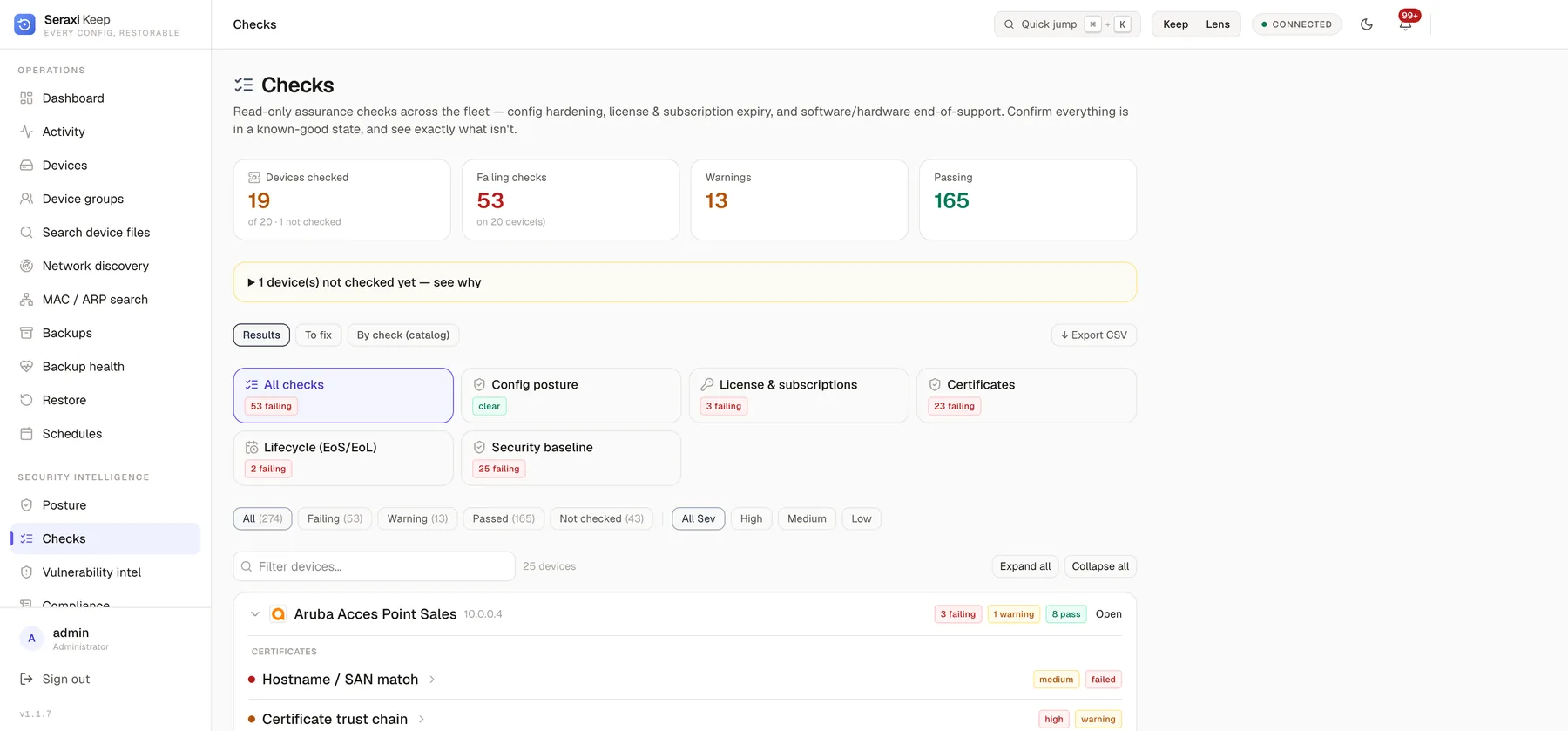
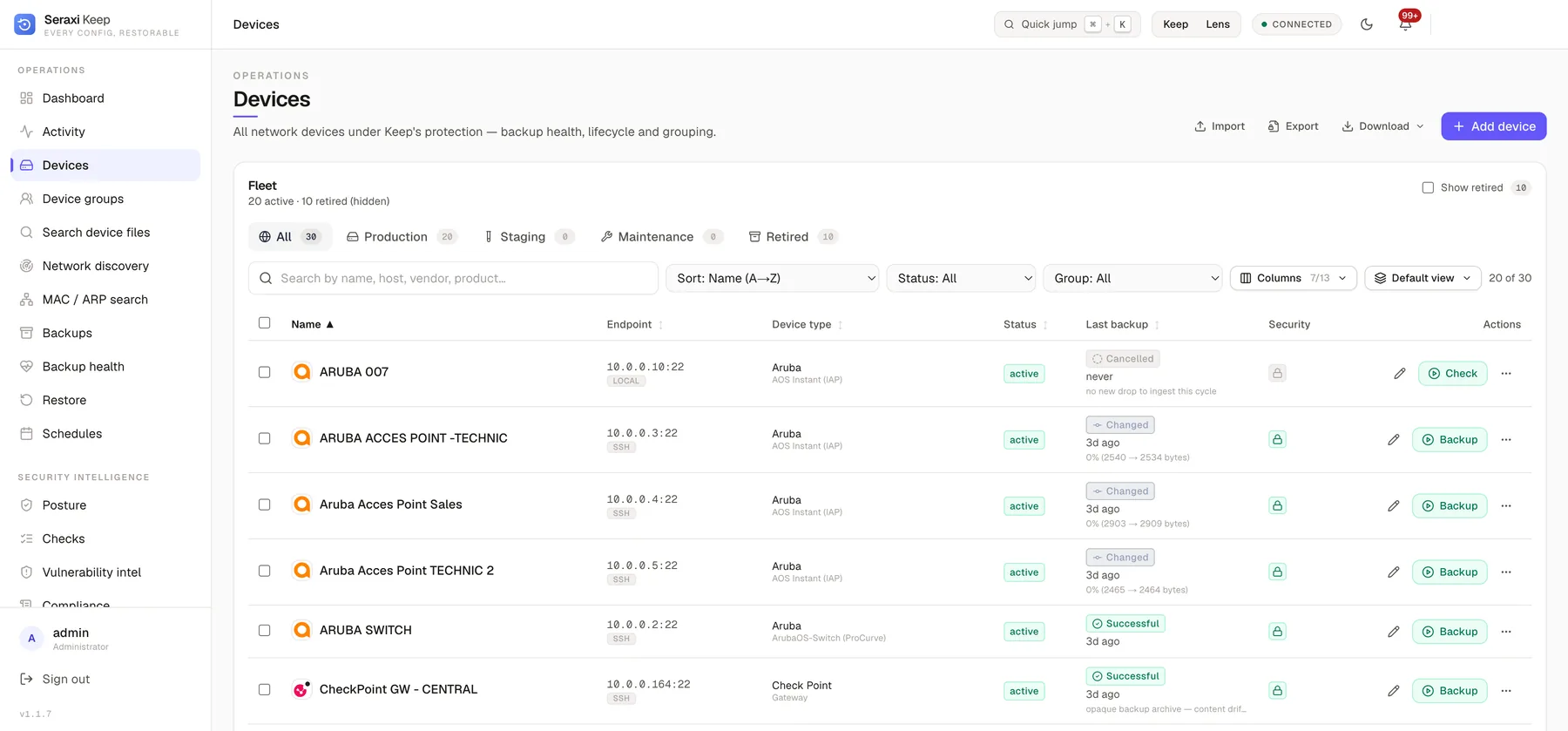
Illustrative data shown. Your deployment runs entirely on your own appliance.
What it does
01
Advisory-to-device matching
Vendor advisories and CVEs are matched against the exact model and firmware of every device in your inventory. When an advisory drops, you get the list of affected devices, not a search task.
02
Configuration baseline & policy controls
Build a signed baseline per device and per vendor, encode your corporate security policy as checks — no default communities, no legacy ciphers, mandatory logging — and see every deviation the moment it happens.
03
Compliance checks
Map configurations to ISO 27001, PCI DSS, BDDK and KVKK controls continuously, not at audit time. Each control shows which devices pass, which fail, and the evidence the auditor gets.
04
Lifecycle: EOL / EOS check
Every model and software train is checked against vendor end-of-sale and end-of-support dates, so an unsupported box never hides in the fleet — and refresh budgets are planned from data.
05
Certificate & SSL management
Inventory every certificate on every device — expiry, issuer, key strength, weak protocols — and get ahead of the outage that expires at 03:00 on a Sunday.
06
Vendor-native backup, verified restore
Agentless backups through each platform's own path, across 50+ vendors, integrity-checked and restore-tested — the safety net under everything above.
How it works
Keep connects, baselines, then checks every device continuously against advisories, policy and compliance.
- 01
Connect
Agentless, vendor-native access to firewalls, routers, switches, SIEM/SOAR and load balancers — 50+ vendors, no scripts to maintain.
- 02
Baseline
Capture and verify each device's configuration, firmware and certificates into a signed baseline you can trust and restore from.
- 03
Assure
Match advisories, enforce policy, check ISO 27001 / PCI DSS / BDDK controls, flag EOL devices and expiring certificates — continuously.
Why teams run Keep
- Answer "are we affected?" in minutes when an advisory is published — from your real inventory, not a spreadsheet.
- Catch unauthorized or out-of-policy configuration changes against a signed baseline, the moment they happen.
- Hand auditors ISO 27001, PCI DSS and BDDK evidence straight from device configurations, instead of preparing it for weeks.
- Never be surprised by an end-of-support device or an expired certificate again.
- Restore with confidence: every backup is vendor-native, integrity-checked and restore-tested.
Assurance
last 24hPart of the Seraxi platform
See Seraxi on your environment.
Book a technical walkthrough. We'll map Trace, Keep, and Lens to your fleet and show you a real backup, capture, and exposure picture — not a slide deck.